Recently, there was news from Feishu: Feishu Multidimensional Sheet has decoupled its strong dependency on other Feishu modules and can now be used independently (access link https://v2ig.cn/srs2Zi5kVY8). You no longer need to download and register the full Feishu suite.

This is pretty great.
I’ve actually discussed this with some friends. Their teams really need some of the automation and AI capabilities of Feishu Multidimensional Sheet, but due to significant financial and time investments already made in other platform ecosystems, they didn’t have the extra budget to purchase the entire Feishu suite service. As a result, they had to give up on Feishu Multidimensional Sheet. Now, with the standalone Feishu Multidimensional Sheet product, this problem is well solved.
However, I’ve also noticed some misconceptions circulating among friends about the standalone Feishu Multidimensional Sheet product, such as it being a new type of AI tool, a super-powered Excel, or that it will soon replace WPS and Office, etc.
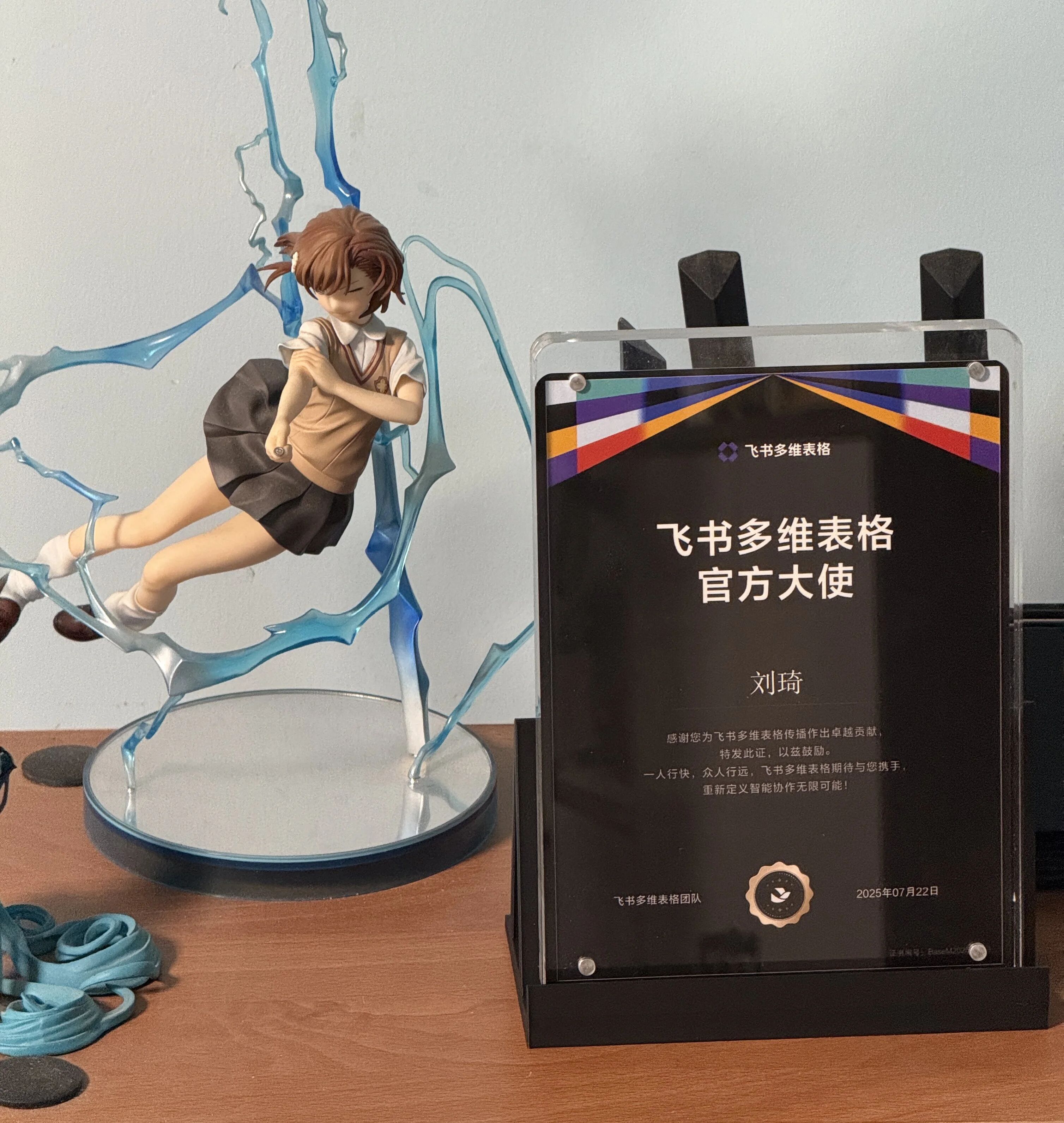
Therefore, as an official ambassador for Feishu Multidimensional Sheet, I feel it’s necessary to write an article to have a good discussion with everyone:
1. What can Feishu Multidimensional Sheet do?
2. Whether you and your team are better suited for the standalone Feishu Multidimensional Sheet product or the Feishu suite.
What Can Feishu Multidimensional Sheet Do
Feishu Multidimensional Sheet should already be an old friend to many of you.
A considerable portion of the readers of this public account likely came because of the Feishu Multidimensional Sheet AI templates I published.
Several of these templates are now used by over 1,000 people, which is quite popular.
Why?
The essence isn’t about how advanced the template-building techniques are, but rather how perfectly the spreadsheet format pairs with AI capabilities.
Batch processing, which requires techniques like loops in Coze and ComfyUI, is just a matter of clicking a few times in Feishu Multidimensional Sheet.
Batch processing often means productivity.
Whether it’s data scraping, flexible pushing, content generation, image generation, image understanding, invoice recognition, logical judgment, or summarization, it can all be achieved in batches with almost zero learning cost in Feishu Multidimensional Sheet.
This can bring very tangible efficiency improvements to individuals and small studio teams.
I won’t go into more detail on this aspect; if you’ve used the spreadsheet templates I published before, you should have experienced it.
This time, we’ll focus on the B2B aspects not previously mentioned.
The scenarios of the templates mentioned above can be tentatively called production application scenarios, which will bring relatively direct efficiency improvements for individuals or small studio teams; but this is not all, because in slightly larger teams, there exists another type of scenario—management application scenarios.
I can even make a somewhat provocative statement: Feishu Multidimensional Sheet has even greater value in B2B business management and personnel management.
However, the content itself and the context in which B2B sharing occurs determine that it’s not easy to achieve widespread dissemination.
Fortunately, our company subscribes to the Feishu Business Ultimate Edition, and the entire team uses Feishu Multidimensional Sheet very frequently. It also happens that I am responsible for building tables in the company, so I can also talk about this aspect.
The cost of Feishu is not low. To give a direct example, our company has over a hundred people, and the annual fee for the Business Ultimate Edition alone is over a hundred thousand yuan.
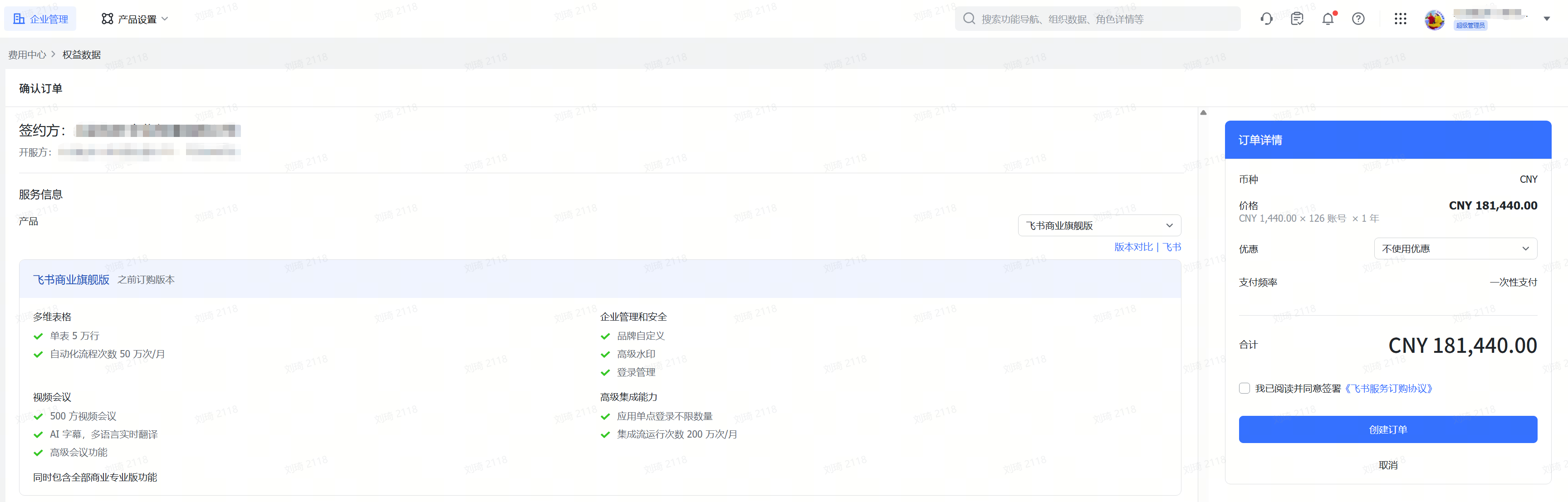
With a specific number in mind, I believe you are starting to grasp the value of the standalone Feishu Multidimensional Sheet product. If you only subscribe to Feishu Multidimensional Sheet, this expenditure can be cut by at least more than half. We’ll get into the details of this part later; first, let’s talk about the actual application of Feishu Multidimensional Sheet in my work scenarios.
Our company is an advertising agency + MCN business company, with 5 work areas in Beijing, Shanghai, Guangzhou, Shenzhen, and Chengdu, as well as some colleagues scattered in other provinces and cities or working remotely overseas. For our team, the greatest value of Feishu Multidimensional Sheet is business management and team collaboration. In contrast, its uses as “a quick AI generation tool” or “a data writing repository for crawling tools like Coze and Yingdao” only account for a very small part. In fact, our talent media management, sales CRM management, business execution management, and the corresponding performance accounting on the finance side are all deeply integrated with Feishu Multidimensional Sheet.
However, internal tables are not convenient to demonstrate directly. I’ll use a simplified CRM process as an example:
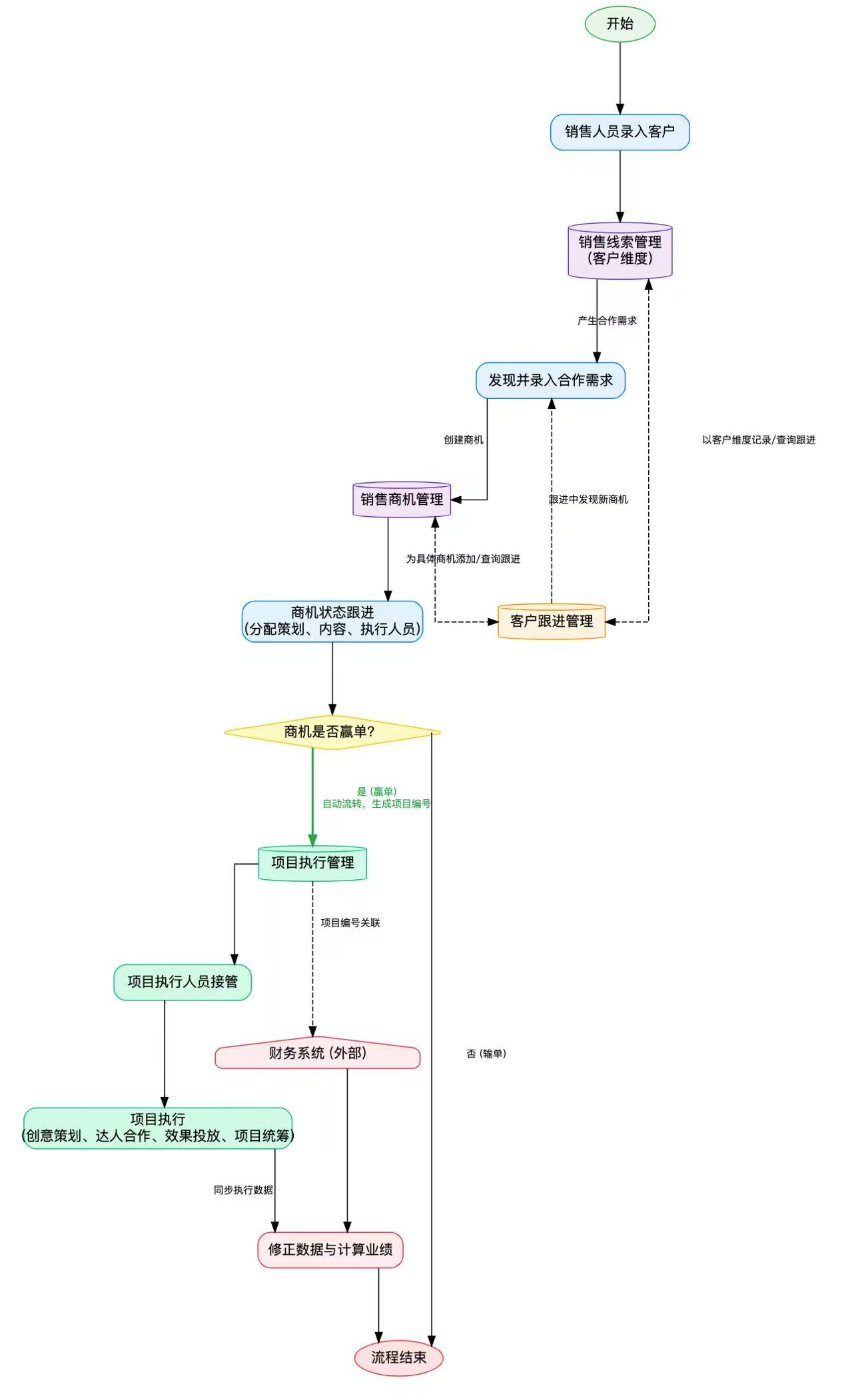
This is a simplified process from customer introduction to project execution completion.
You’ll find that there are interrelated fields between each link. For example, a sales lead (customer) can have multiple opportunities and a one-to-one corresponding salesperson; when the opportunity status changes, new personnel and sub-processes will be introduced. For instance, during the proposal submission stage, the opportunity will be assigned to a corresponding creative planner. If the bid is ultimately won, the handover will go to the project coordinator-led project execution; the project is linked to the financial system data through its number, and at the same time, the financial data can be linked through the project to the opportunity, sales, and personnel corresponding to different execution stages.
If you are familiar with Excel’s vlookup function, you’ll realize that because there is a chain of interconnections between the steps above, if I know one piece of data in the entire process, I can query another piece of data in other steps. This operation can also be done using formulas in Feishu Multidimensional Sheet, but there is also a dedicated function called ‘Lookup Reference’.
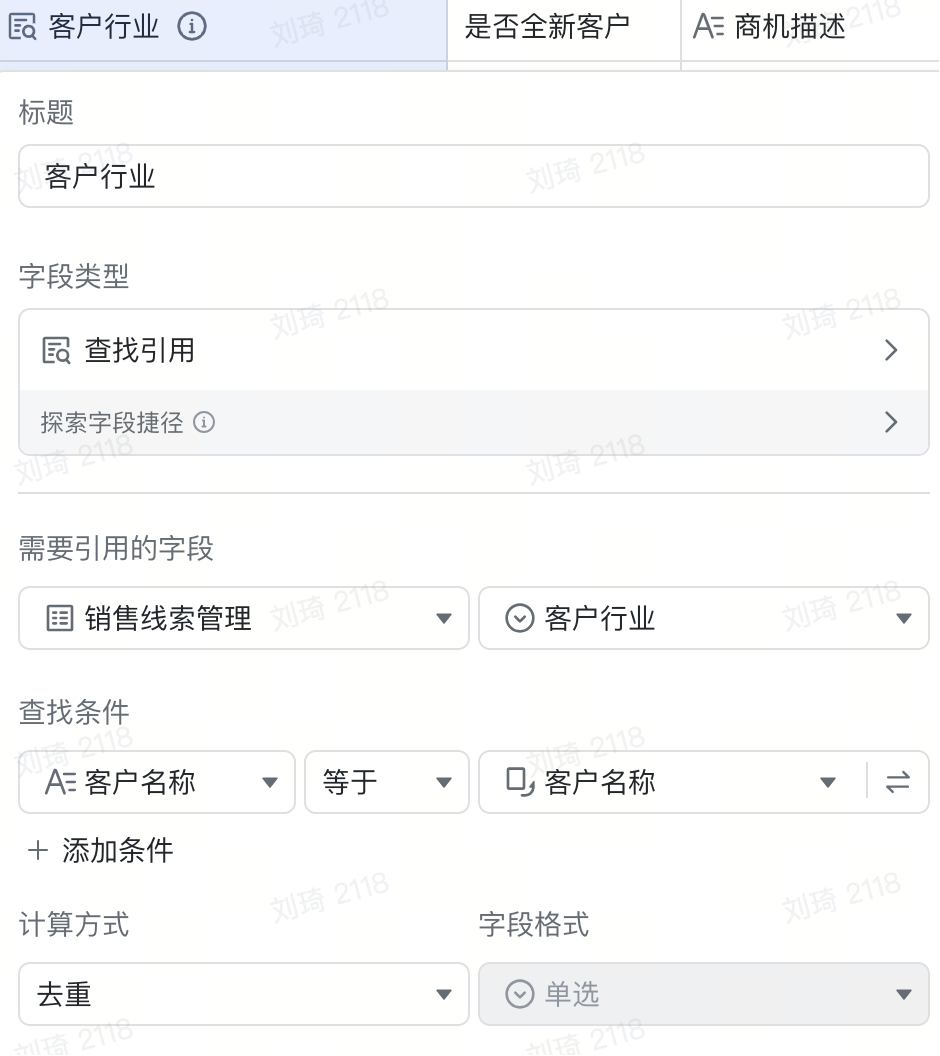
Now, we can achieve this: the customer industry only needs to be entered once when recording the sales lead. Later, all opportunities and projects related to that customer can automatically obtain the industry affiliation through the association of the customer name (or customer code).
Furthermore, for each project, we have the project amount recorded. By combining simple formulas, we can calculate and rank the cooperation amount for each industry. Going a step further, by introducing the opportunity status field, we can also calculate the industry ranking of won/lost bid amounts separately. Combined with simple quantity statistics, we can calculate the win/loss rate for each industry. By further introducing time, we can gain insights into how the industry ranking has changed this month compared to last month, what changes the win/loss rate has undergone, and thus design improvement plans for the next month. In the following month, we can also track the effect of the corresponding adjustments.
Similarly, personnel management is also interconnected. I can directly build a dashboard to view the total number of projects and amounts each executor colleague has on hand, identify their workload saturation for more reasonable work allocation, and also, with certain calculations, analyze which type of business each person is more skilled at and which type of customers they are better at maintaining and developing.
For small and medium-sized enterprises, this form of CRM is much more friendly in terms of flexibility and usage threshold compared to traditional SaaS-type CRMs.
Feishu Multidimensional Sheet also provides comprehensive advanced permission features for enterprise teams.
Through different role configurations, you can control the visibility and editability of records and fields down to the individual person level.
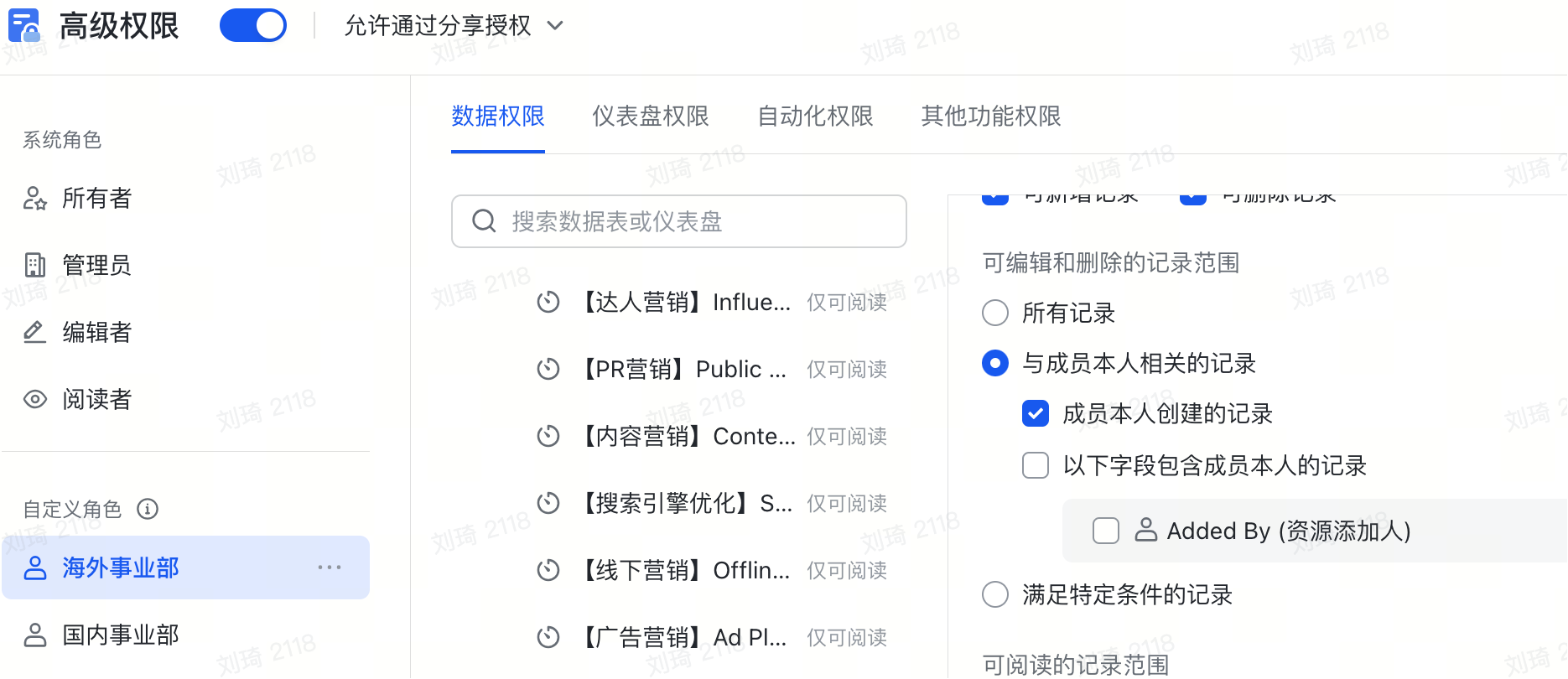
For example, in some scenarios where different salespeople compete, you can set the visibility of opportunity records to be visible only to the creator. If, on this basis, there is management by sales team groups, you can use a personnel field to bring in the direct superior from the organizational structure and check records that include members in the field. This way, the team leader can view the records of group members.
Another example: the same table requires collaborative entry from different roles, but the information entered is independent for each. Then, you can avoid misoperations by setting the visibility/editability range of fields, while centrally displaying data effective for different roles, which can especially improve the entry efficiency for colleagues on small screens.
However, the example above where different roles enter independent information in the same table is, in my personal opinion, not a good table-building practice. A more recommended approach is to split related necessary information into different tables. For instance, opportunity follow-up and project follow-up should theoretically be managed by colleagues from the sales and execution departments respectively, so they should be divided into two tables: an opportunity table and a project table.
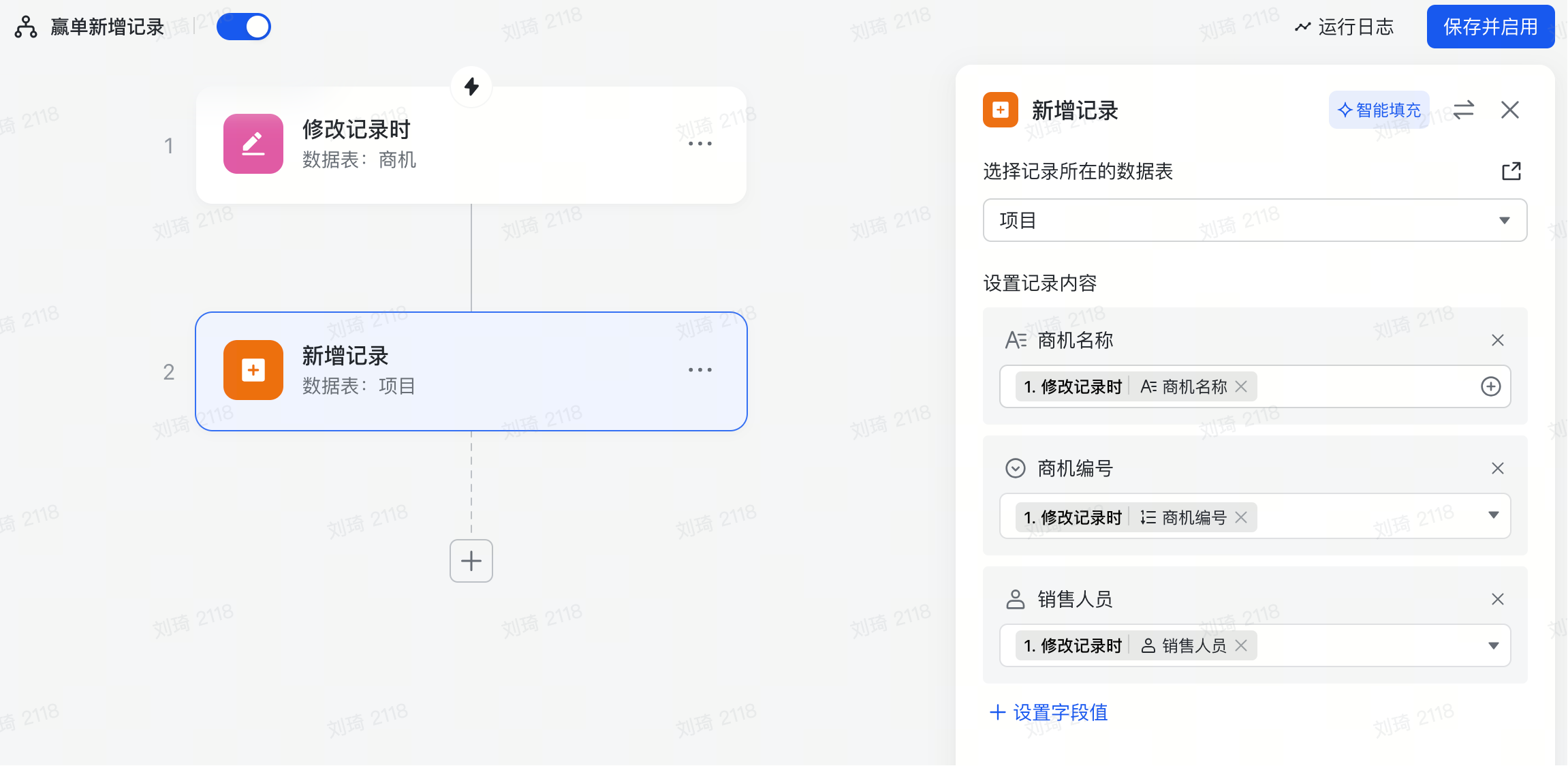
At this point, there’s an issue. If split into two tables, some necessary information needs to be transferred between the two tables. If the project table doesn’t have the opportunity number or opportunity name, it cannot use this field to look up and reference the customer industry. What we hope for is that when an opportunity becomes a won bid, the table automatically copies the opportunity number, opportunity name, and salesperson from the opportunity table into a new row in the project table.
The function that realizes this is the workflow.
The logic of the Feishu Multidimensional Sheet workflow is actually very simple. You can roughly understand it as ‘When… then…’.
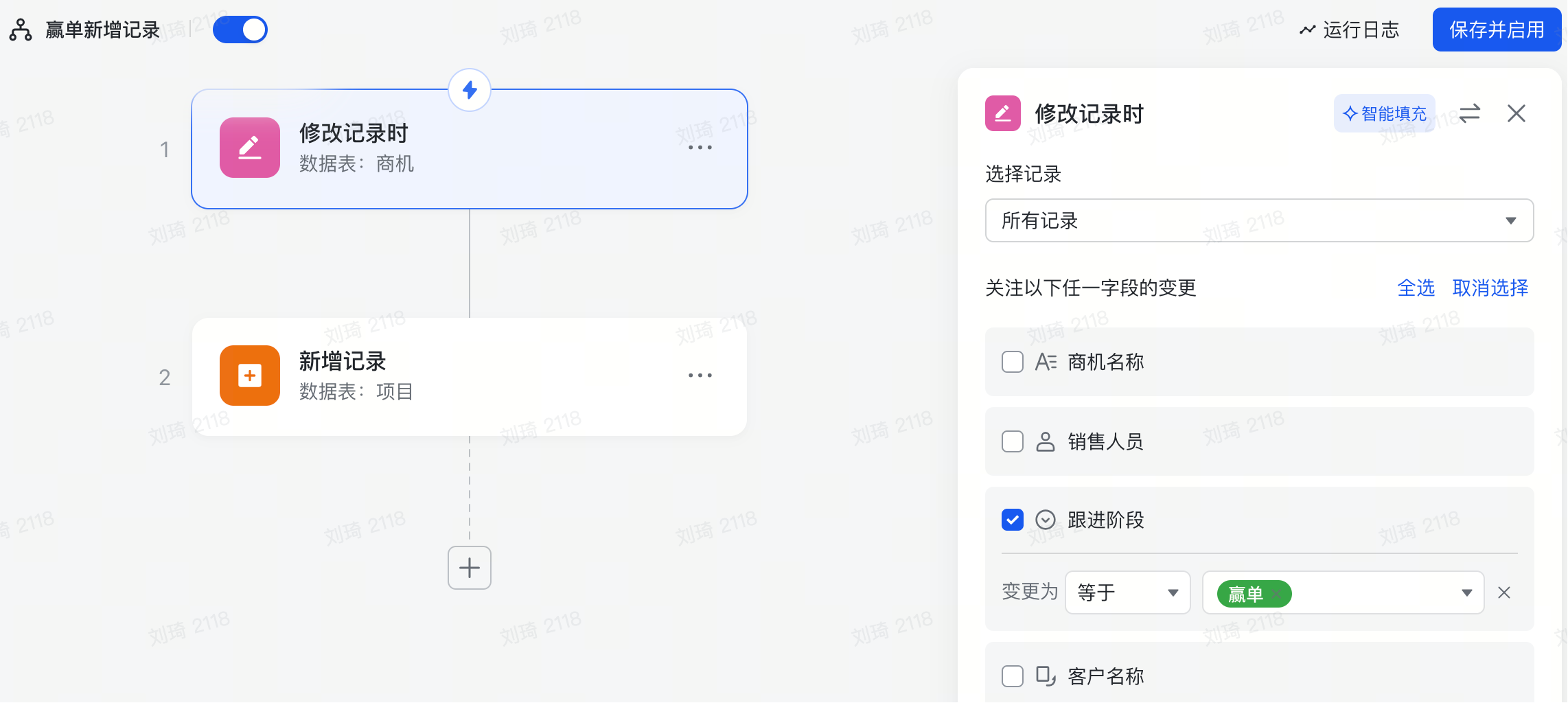
The meaning of setting the record content below is to fill the opportunity name, opportunity number, and salesperson from the won bid record in the opportunity table into the corresponding positions in the project table.
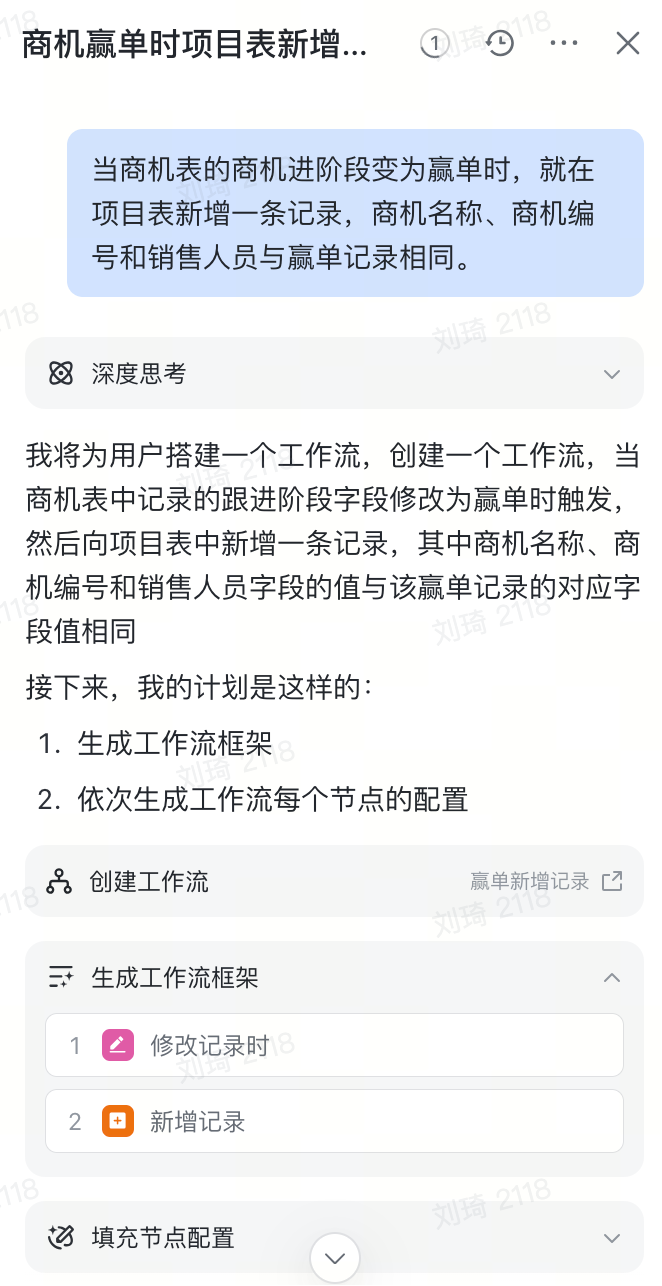
For building workflows now, I highly recommend you try the newly launched agent function. As long as you explain the requirements clearly, one sentence can automatically complete the workflow setup, like this:
This is also one of the upgraded capabilities of Feishu Multidimensional Sheet mentioned at this year’s Feishu Future Infinite Conference:
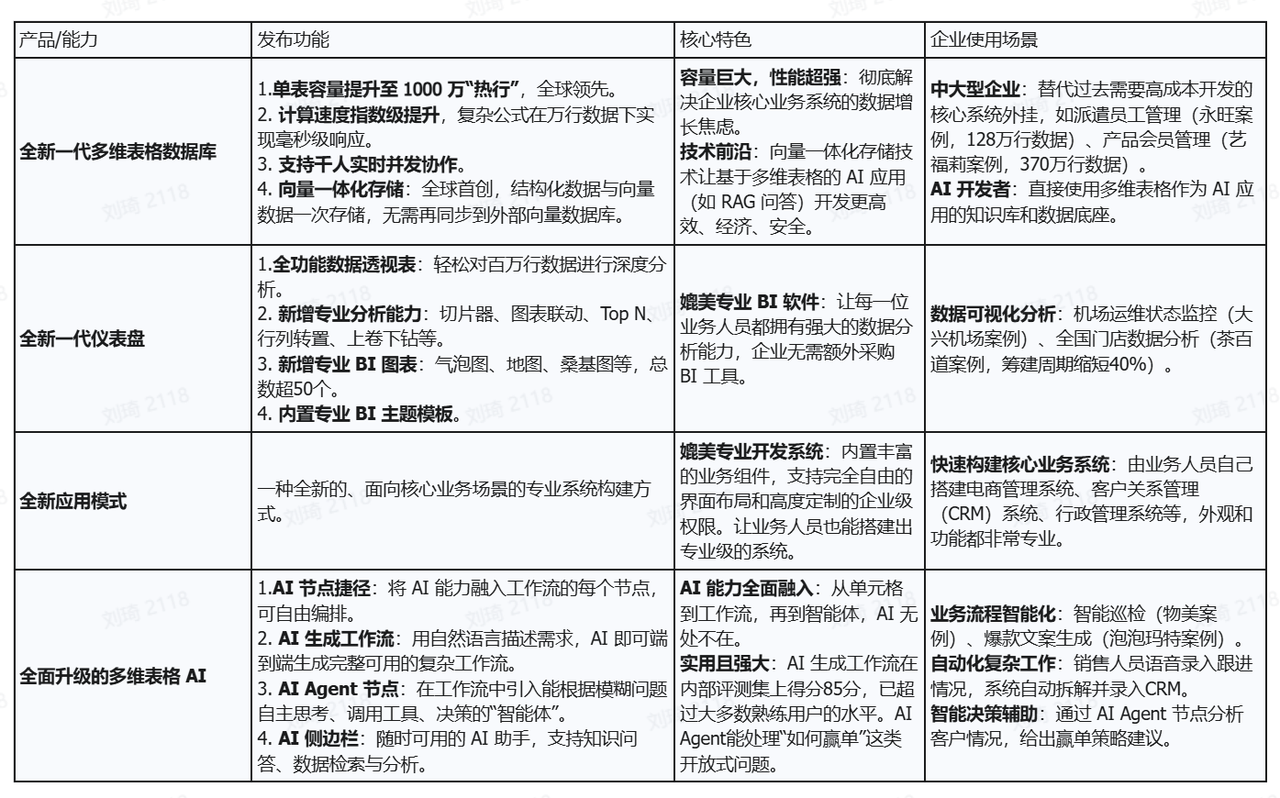
I’m not sure if the AI-generated workflow feature is already in public beta. If not, you can check the messages from the Multidimensional Sheet assistant to join the internal beta group.
I have to say that ByteDance’s speed is indeed fast. The internal beta for new features has already reached the third batch.

This is also one of the reasons I like Feishu Multidimensional Sheet: its iteration speed and ecosystem are very strong among similar products.
Let me give two recommendations.
① One is the Feishu Community, which has many great courses and templates:
https://www.feishu.cn/community
You might even spot a share from our company and templates I made on the homepage (lol).


If you want to find references for Feishu Multidimensional Sheet in B2B management application scenarios, I can provide a keyword—’Manage a company with one sheet’.
② The other is Wang Daxian’s Feishu Multidimensional Sheet course, which I give equally to every new colleague working with Feishu Multidimensional Sheet:
https://larkcommunity.feishu.cn/wiki/RXjcwGsKsijxVskRb35caB4enng
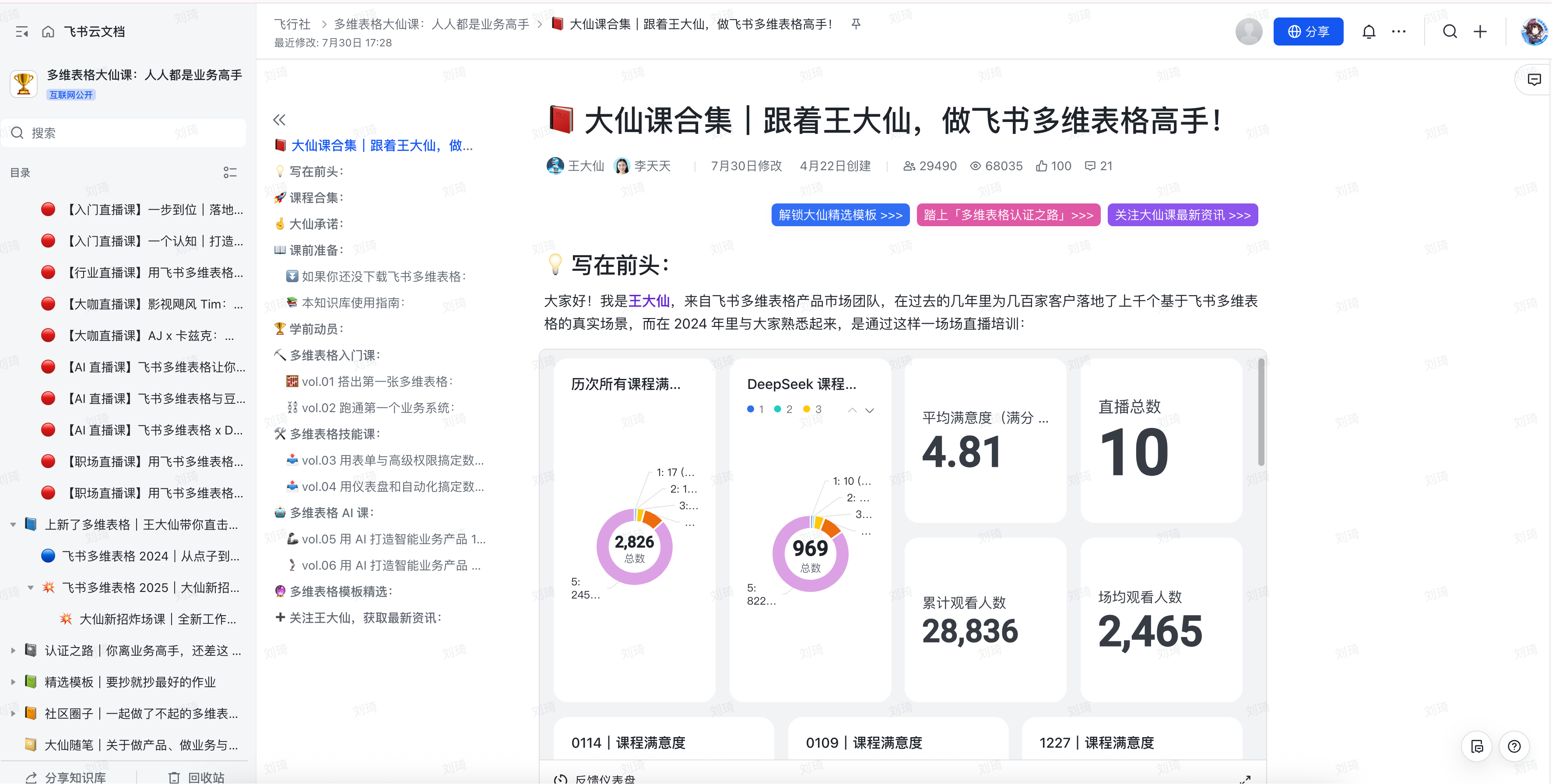
The official willingness to put effort into creating such a comprehensive and detailed course is especially good for companies, because at least our company’s conditions do not allow for such a significant investment in employee skill training.
I really keep this link handy and send it to colleagues who have a need to learn Feishu Multidimensional Sheet. It’s not only convenient but also more detailed than teaching by hand.
Choosing the Standalone Product or the Suite
Now, let’s answer this question that many people don’t quite understand.
① First, you need to understand what the standalone Feishu Multidimensional Sheet product and the Feishu suite each include.
The standalone Feishu Multidimensional Sheet product, as the name suggests, only includes Feishu Multidimensional Sheet.
It does not include commonly used Feishu features like Feishu Meeting, Feishu Minutes, Knowledge Base, OA Approval, etc. Most notably, it also does not include Feishu Docs and Feishu Sheets (the traditional spreadsheet).
For a standalone Feishu Multidimensional Sheet tenant, when creating a new document in the ‘Cloud Documents’ interface, only the following types are available.
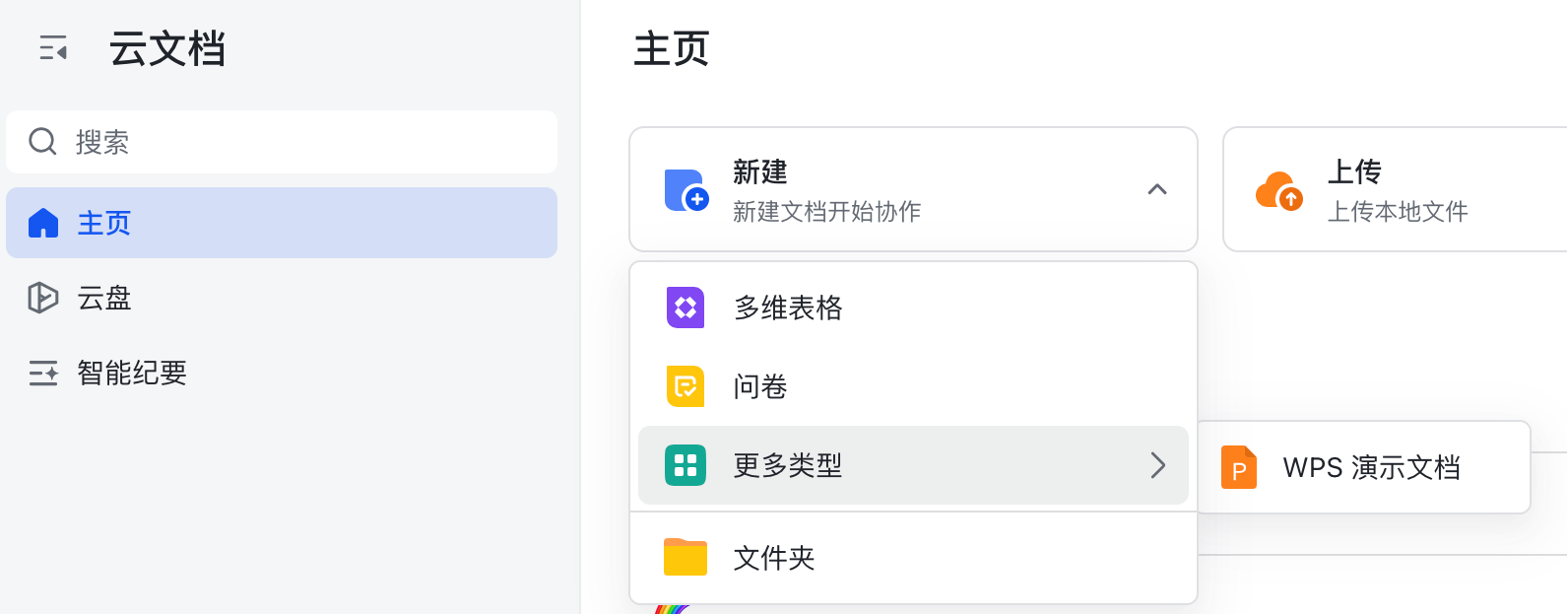
You can create explanatory documents within Feishu Multidimensional Sheet, but these documents cannot be shared independently like regular Feishu Docs.
Whereas the Feishu suite, even the basic free version, includes features like Meeting, Approval, Knowledge Base, Feishu Docs, and Feishu Sheets, albeit with limitations on quotas and storage space.
② What are the feature quotas and costs for each version of the standalone product and the suite?
The official websites for the standalone Feishu Multidimensional Sheet (https://base.feishu.cn) and the Feishu suite (https://www.feishu.cn/service) both have comparisons of different versions.
I used ChatGPT to help organize it into a table for everyone:
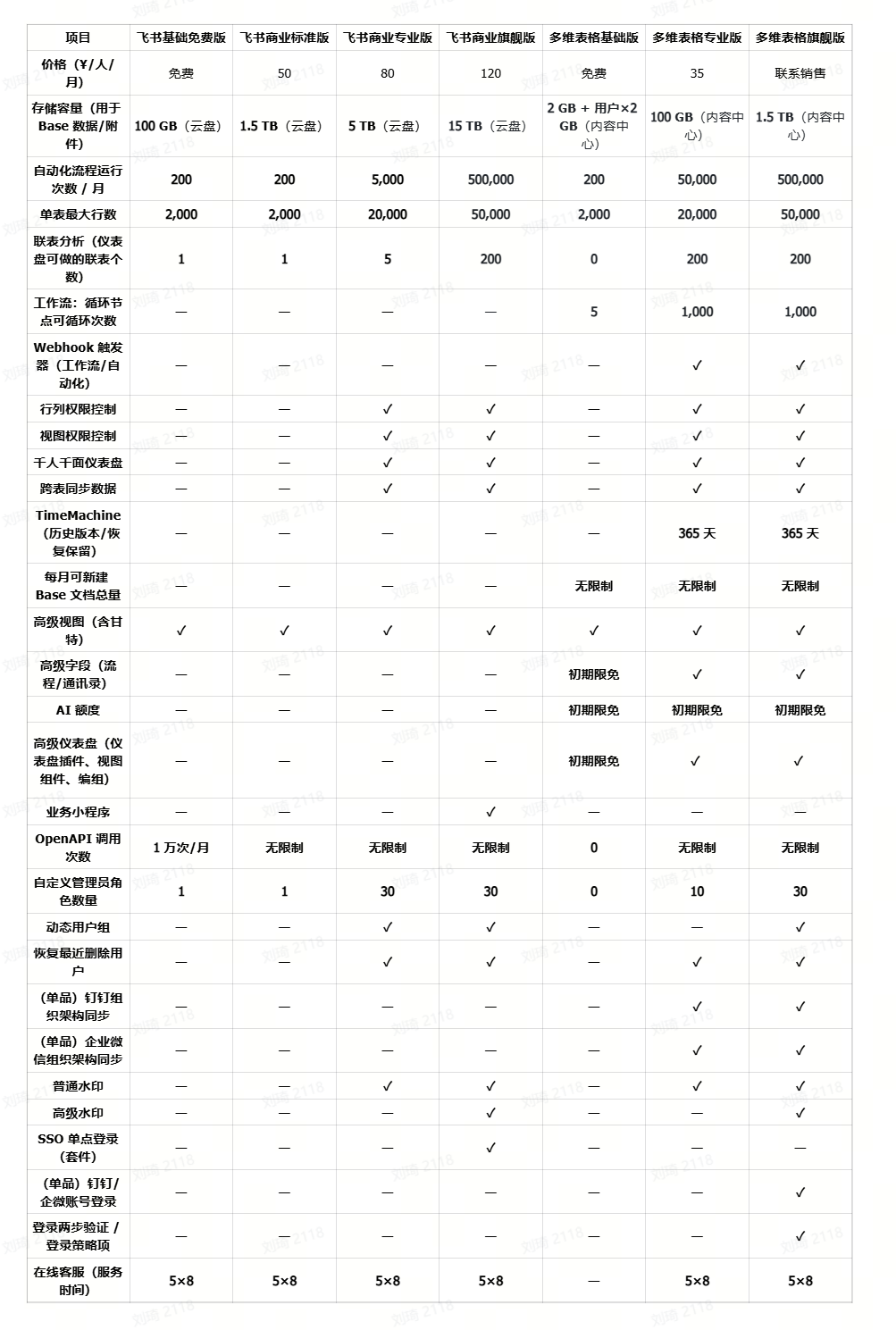
There are quite a few items. You can prioritize looking at these three: price, automation run count, and maximum rows per table.
Generally, I would give the following advice:
- If you have no budget and plan to use the free basic version directly, it is more recommended to choose the Feishu suite. Because in terms of Feishu Multidimensional Sheet feature quotas, the free versions are basically the same, and the suite comes with Feishu Sheets, Feishu Docs, Knowledge Base, and currently Feishu’s free basic version also supports the ‘Knowledge Q&A’ feature. These are all very practical, and it’s not advisable to miss out.
- The 50 yuan/person/month Feishu Business Standard Edition: If you have a need for Feishu Multidimensional Sheet, to be honest, this tier is a bit awkward. It only has 200 automation runs per month. Whether it’s automatically adding records or pushing message reminders, they all consume this count. As soon as your team has three to five people, it’s basically impossible to be enough. Furthermore, it does not include the complete advanced permissions for Feishu Multidimensional Sheet. In comparison, the 35 yuan/person/month Feishu Multidimensional Sheet Professional Edition supports advanced permissions, 50,000 automation runs per month, and a maximum table row count of 20,000, which is much more generous. I would more suggest you consider the standalone Feishu Multidimensional Sheet Professional Edition, or the Feishu Business Professional Edition. But note that the Feishu Business Professional Edition has 5,000 automation runs/month; evaluate first whether that’s enough.
- The 80 yuan/person/month Feishu Business Professional Edition: The automation run count is a hard feature gap compared to the Feishu Multidimensional Sheet Professional Edition. Beyond that, the core difference is in cost-effectiveness. The price of the Feishu Multidimensional Sheet Professional Edition is less than half of the Feishu Professional Edition. Assuming you are currently a 10-person team, the Feishu suite Professional Edition would cost 5,400 yuan more than the standalone Feishu Multidimensional Sheet Professional Edition. Especially when your existing office software ecosystem is WeCom or DingTalk, I would more recommend you choose the standalone Feishu Multidimensional Sheet Professional Edition. Through webhooks, you can also trigger workflows and send/receive reminders.
- The 120 yuan/person/month Feishu Business Ultimate Edition is the version my current team is using. With 50,000 table rows and 500,000 automation runs/month, at the pure Feishu Multidimensional Sheet level, it’s basically sufficient for a 100-person team. Choosing this version actually depends on the office ecosystem beyond Feishu Multidimensional Sheet. If your team is already deeply integrated into the WeCom or DingTalk ecosystem, of course, you should first look at the standalone Feishu Multidimensional Sheet product. However, based on my personal experience, products like Feishu Docs, Feishu Sheets (Feishu Multidimensional Sheet is essentially a database, not a universal cure-all, and cannot replace spreadsheets), Knowledge Base, and Feishu Meeting (for example, real-time AI translation is a feature of the Ultimate Edition, which is quite useful for communicating with overseas colleagues or watching overseas product launches) are also products I use very frequently. If your office product ecosystem is migratable, you can also try Feishu.
- The 35 yuan/person/month Feishu Multidimensional Sheet Professional Edition: As long as you deeply use an office ecosystem outside of Feishu and have a need for Feishu Multidimensional Sheet, looking at this version first is the right move. Compared to the suite, the cost-effectiveness of the standalone Professional Edition is excellent. Its automation run count is 10 times that of the suite’s Professional Edition, while the price is less than half, directly saving the money wasted by bundling and purchasing the suite. If, on this basis, you have a very large number of records and very high automation usage, then you can inquire about the pricing for the standalone Feishu Multidimensional Sheet Ultimate Edition.
Alright, that’s all the content of this article. I hope it helps you with using Feishu Multidimensional Sheet and choosing the right version.