I’ve been playing with Alibaba’s newly open-sourced Wan2.1 for the last couple of days.
There are many demonstrations of text-to-video online for this model, but not many for image-to-video, so I want to talk about that.
I typed out a bunch of words and then deleted them; let’s just show the demo directly.
Right now, on the shelf above my computer desk, there’s a Super Sonico bunny girl figure that looks like this:
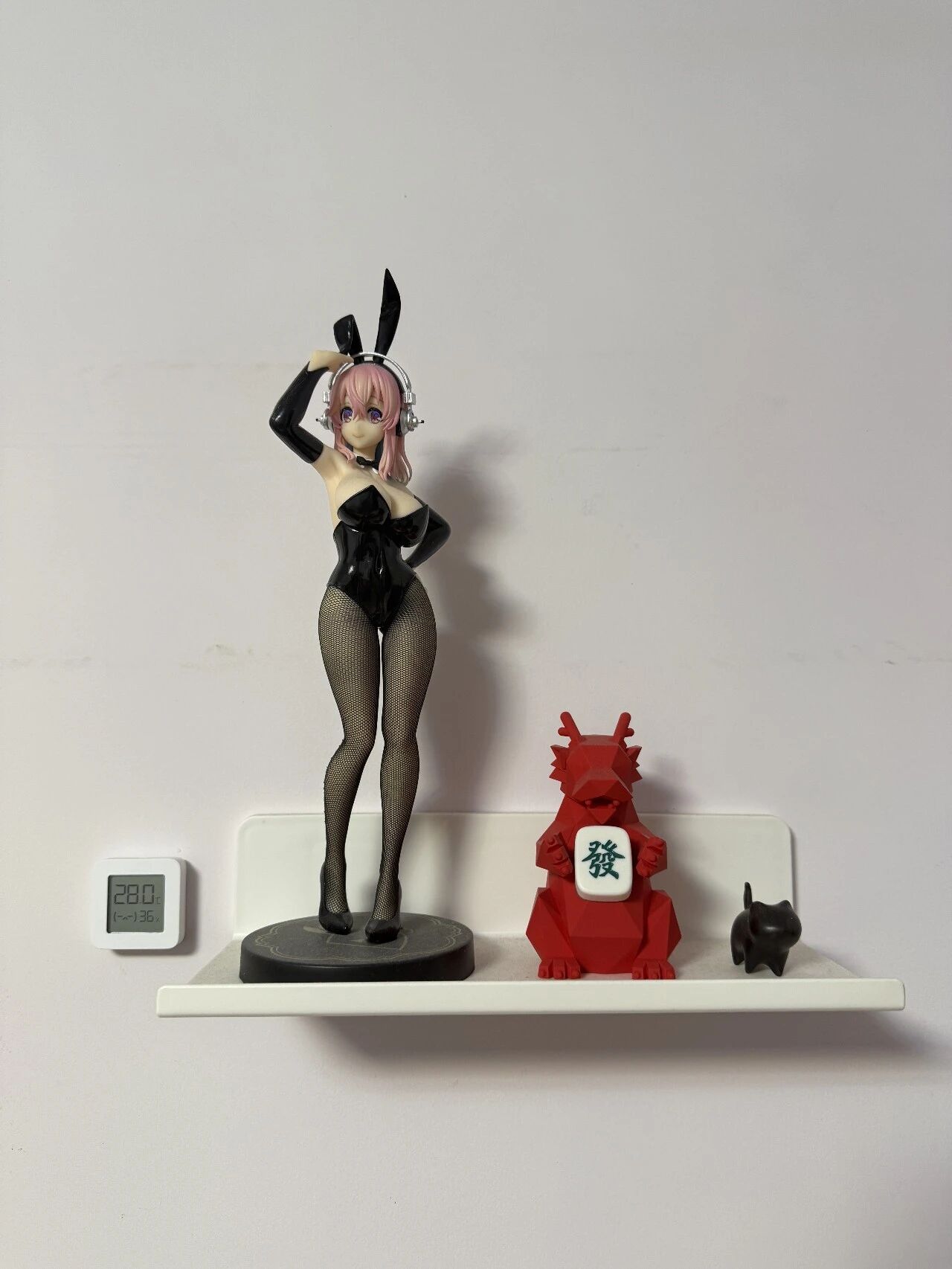
I took a casual photo to use as source material.
This bunny girl outfit—I think her high heels are a bit high, and her ankles must be tired from standing.
How about letting her move around a bit:
Legs are numb too? How about some exercises?
Notice how the shadow follows—this is the effect generated by Wan2.1 deployed locally.
What do you think?
While looking through materials, I happened to find a video from a year ago that I ran locally, so I’ll show it to everyone as well; it looks like this:

I can’t help but sigh at how fast technology advances.
Now let’s compare it with the leading competitor, Kling.
This is an image I generated with SD1.5:
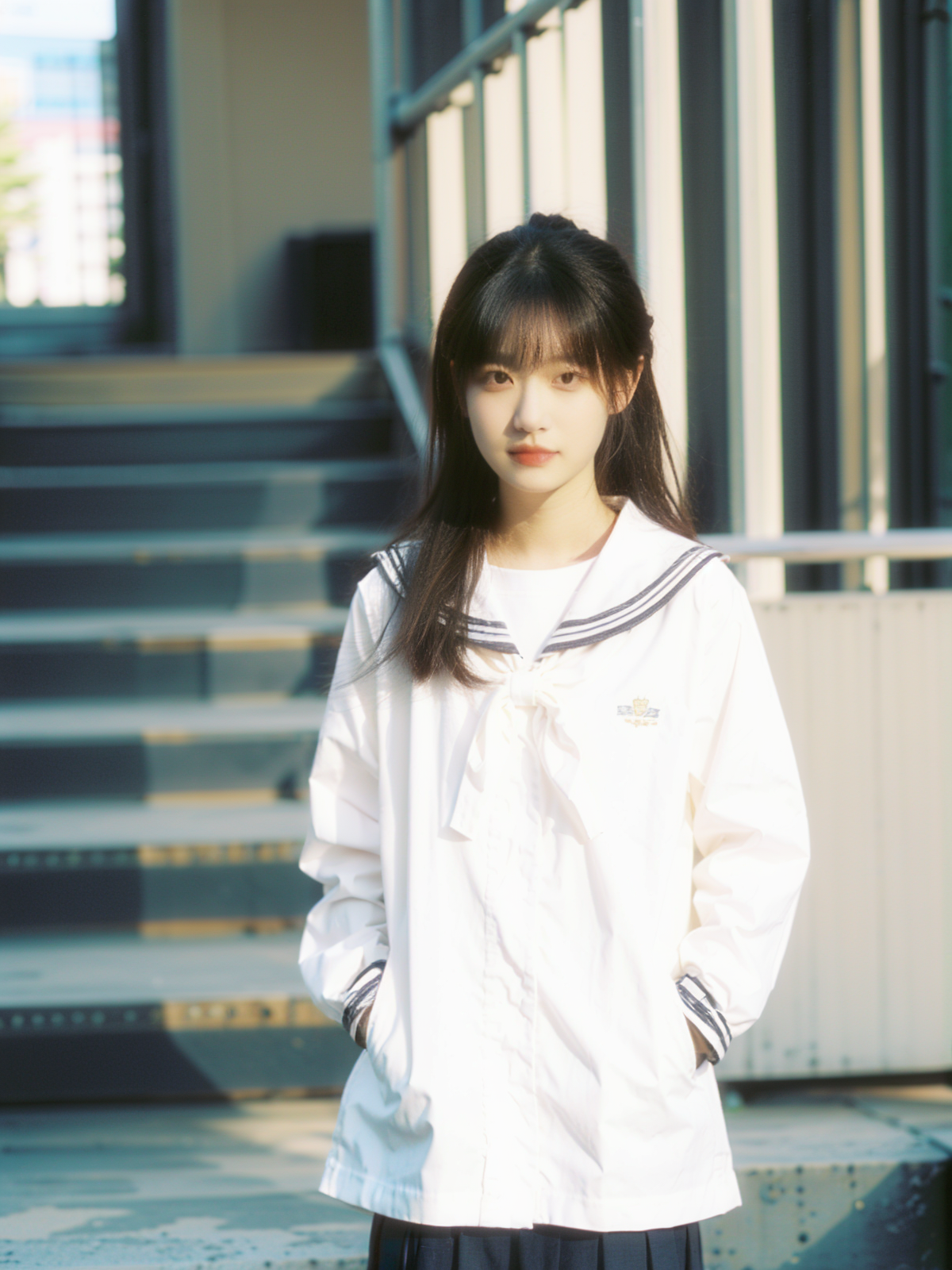
Back then, I really loved the hands-in-pockets pose; those who lived through it should understand.
She probably never imagined that one day we’d make her take her hands out of her pockets to tuck her hair behind her ear.
Prompt:
A young female student in a white sailor uniform, with straight black hair and bangs, a delicate face, and rosy lips. Standing in a campus stairwell, sunlight slants through the window, casting warm light spots on her face and white clothes, with a blurred staircase and railing in the background. She gently blinks her eyes, the corners of her mouth slowly lift into a slight smile, then she lowers her head to look at the ground, her fingers unconsciously lightly brushing the hanging strands of hair, tucking them behind her ear, then she gently puts her hands into her uniform pockets, slightly tilts her head to look into the distance, with a hint of contemplation and longing in her eyes. The camera uses a close-up shot, softly capturing her subtle expression changes and movements, then slowly pans to the side, showing her elegant standing silhouette. The entire scene is filled with a quiet and warm atmosphere, brimming with the breath of youth, Japanese youth film style, soft vintage tones, with a faint nostalgic feel like a film camera.
First, Wan2.1.


Parameters used: fp8/14b/480p/20steps/24fps. Generating 3-5 second videos like this, an RTX 4090 graphics card can generally complete it within 5-10 minutes, comparable to online platforms.
Let’s generate two clips: one 3 seconds, one 5 seconds.
3-second version:
5-second version:
Next, Kling.
Directly using the latest Kling 1.6, uploading the image for first-frame generation. Kling video length can be chosen as 5s or 10s, with standard and high-quality versions.
We uniformly select 5-second length and generate one of each version.
Standard version:

High-quality:

Looking purely at the final output, I personally think the strongest is still Kling 1.6’s high-quality mode. I have to admit, Kling is indeed strong. But I think Wan2.1’s level can be considered between Kling’s standard and high-quality versions, especially in instruction following, which is clearly stronger than Kling’s standard version.
Moreover, when using a consumer-grade or better graphics card, you can further increase Wan2.1’s precision, steps, and resolution for even better results.
Friends who have some understanding of the AI video field know that the engineering importance of image-to-video is much greater than outsiders imagine. If only text-to-video is used, the difficulty of creating the final video increases geometrically.
P.S.: Yesterday, AI.TALK Teacher Han Qing’s new short film “LONELY” was created entirely using Google VEO2 text-to-video, without using image-to-video. Impressive.
At the same time, I believe the application of image-to-video in general work scenarios beyond video creation is also higher than pure text-to-video.
For example, in my previous article introducing Mermaid: DeepSeek-R1 Usage Tips: Learn This One Prompt to Have AI Generate Various Cool Charts for You, the cover image, if anyone remembers, looked like this:

Suppose I am now making a presentation PPT, and this is my PPT cover. I want to make it cooler; I want the water and fish to move, but the Mermaid text in the background should not change. How do I do that?
Wan2.1 image-to-video can accomplish this need.
Prompt:
An animated style mermaid scene, with orange-red "Mermaid" text floating at the top of the frame. In the deep blue waters, a red-haired mermaid girl floats on the surface, wearing an orange-red shell top, her long hair gently floating in the water, eyes blinking, corners of her mouth slightly raised. Orange-red fish swim agilely around her, some passing by her side, some swimming in the depths. Ripples form on the water surface, light and shadow flicker and change underwater. The camera uses a fixed perspective, capturing the natural flow of underwater creatures. The entire scene is filled with a dreamy and mysterious atmosphere, anime illustration style, strong color contrast, the blue waters and orange-red elements complementing each other.
Generated video:

Both base images above are AI-generated; using a photo can yield a more realistic effect.
For example, this image:

Prompt:
The camera captures from the side an elite businessperson in a black suit, standing in a decoratively ornate corridor, holding a cup of coffee. His expression is calm, brow slightly furrowed, eyes revealing thought and decisiveness. He slowly raises the coffee cup to his lips, takes a light sip, then slightly lowers his head to gaze at the liquid in the cup, a flash of satisfaction and relief in his eyes. The background is beige walls and gold frames, creating a formal and dignified atmosphere. The camera uses a close-up shot, capturing subtle expression changes as he drinks the coffee. The entire scene is filled with an atmosphere of strength and composure, commercial documentary style, cool and restrained tones.
Output video:

Furthermore, as an open-source model that can be deployed locally, Wan2.1 will have some advantages that online platforms cannot match. SD players understand.


Friendly reminder: Light indulgence is enjoyable, overindulgence is harmful.
Now let’s talk about local deployment.
First, a big thumbs up is still needed. Compared to Jieyue’s Step-Video-T2V next door, which requires 80G of VRAM right off the bat, Wanxiang at least can be played with.
But honestly, running Wan2.1 at full capacity locally is still very demanding. After all, it generates video, and the computational requirements are definitely higher than Flux.1. The image-to-video is a 14B model. I tested it myself with a 4090, and the fp8 quantized 480p is more comfortable to use. Any higher precision or resolution will make generation time longer, leading to a decreased experience.
Based on my own experience, I don’t recommend players below a 4070Ti attempt local deployment. Unless your need is text-to-video.
Wanxiang thoughtfully prepared a 1.3B/BF16 precision text-to-video model, which a 4070 can run smoothly. A 4090 can generate a 3-second video in less than a minute and a half.
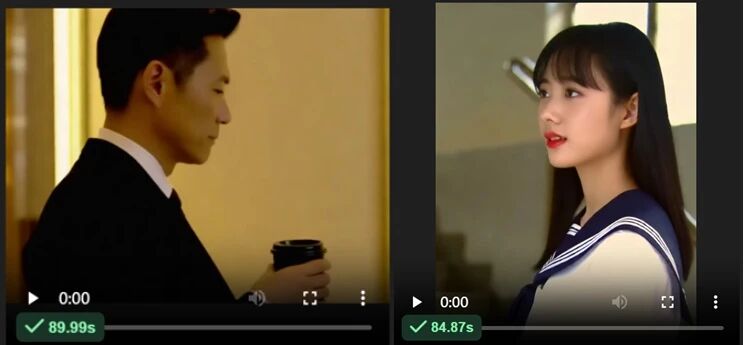
The number of videos inserted in this article has reached the limit, so I won’t show the effect. My personal assessment is, unless you need a large volume, or if you mind watermarks in this production process, using online text-to-image is also a good choice.
But I think local deployment can still be discussed. Why? Because many people like to talk about cards (GPUs) but ignore the matter of computational power rental.
Regarding the buffs individuals can obtain in the AI era, I have always had some shallow insights: two cloud services may increasingly shift from ToB to ToC. One is cloud servers, the other is cloud computational power.
Personal cloud servers, I often mentioned in my previous articles. For a rental price of less than 100 yuan/year, you can get a public IP address that can be accessed anytime, anywhere, plus a Linux host more suitable for production, with configurations not high but sufficient for individuals. With it, you can call various AI APIs, use AI programming to shape it into the form most suitable for yourself, and then it becomes your private cheat for navigating the world; you can even open it up for others to use, providing services.
Personal cloud computational power can also be considered a type of cloud server, just with higher configurations. Many people tell me you have a 4090, etc. Indeed, being willing to spend money to buy a graphics card is also an execution barrier. But I can remind everyone that many computational power rental platforms rent 4090s at internet café prices, from a little over one yuan to a few yuan per hour, which is enough to complete some tasks that don’t require long-term follow-up. This is like a camera; it’s a bit counterintuitive. They all say film is expensive, developing and reprinting still requires shipping fees, but if you buy a digital camera and don’t use it enough shutter actuations, it’s really hard to say whose cost is higher.
I’m not doing any advertising here, nor am I recommending platforms; everyone please judge for themselves. I just want to remind you that if computational power is too cheap, try not to put important files and data in it.
Below is a deployment tutorial with a relatively short path that doesn’t require a VPN, summarized by myself:
1. Go to Bilibili to download a Ye Qiu ComfyUI integration package.
The specific address is in the comments of the video below:
https://www.bilibili.com/video/BV1Ew411776J
Unzip and use, remember to update to the latest version.
2. Go to the ModelScope community to download the Wan2.1 model.
ModelScope is an AI large model open-source community under Alibaba Cloud, accessible directly from within China, and the file download speed is very fast.
We won’t directly download the model released by Tongyi Wanxiang; deploying that requires certain professional technical knowledge. Instead, we’ll download the model packaged by Comfy Org. As long as you updated ComfyUI to the latest in the previous step, you won’t need to install any additional nodes; it’s ready out of the box.
The specific address is:
https://www.modelscope.cn/models/Comfy-Org/Wan_2.1_ComfyUI_repackaged/files
The directory structure looks roughly like this:
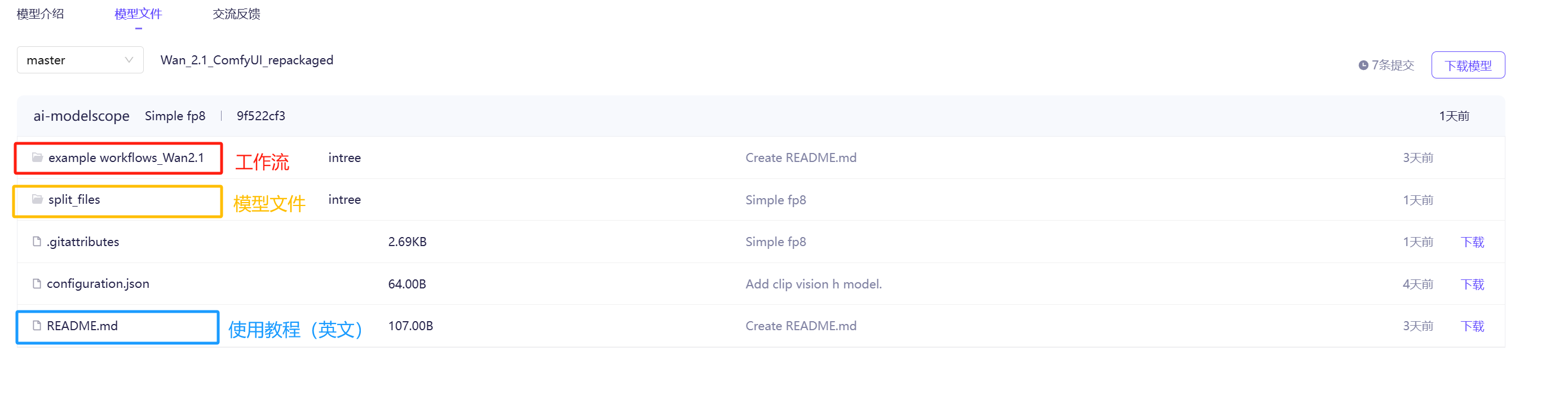
Then download the model files (i.e., the content under the split_files folder).
There are a total of 4 subfolders:
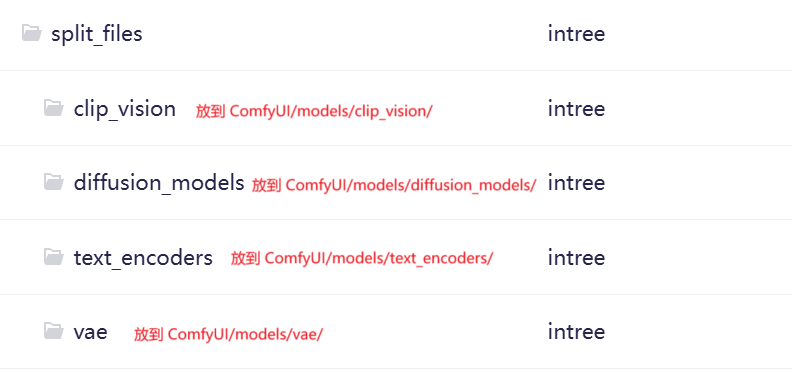
Under clip_vision, there is only one file, clip_vision_h.safetensors. Download it to the ComfyUI directory Comfyui/models/clip_vision/.
Under vae, there is also only one file, wan_2.1_vae.safetensors. Download it to the ComfyUI directory ComfyUI/models/vae/.
Under text_encoders, there are two files, text encoders in fp8 and fp16 precision respectively. You can choose one based on your computer configuration, or download both.
The files under diffusion_models are larger. You can refer to the image below and download as needed based on your configuration.
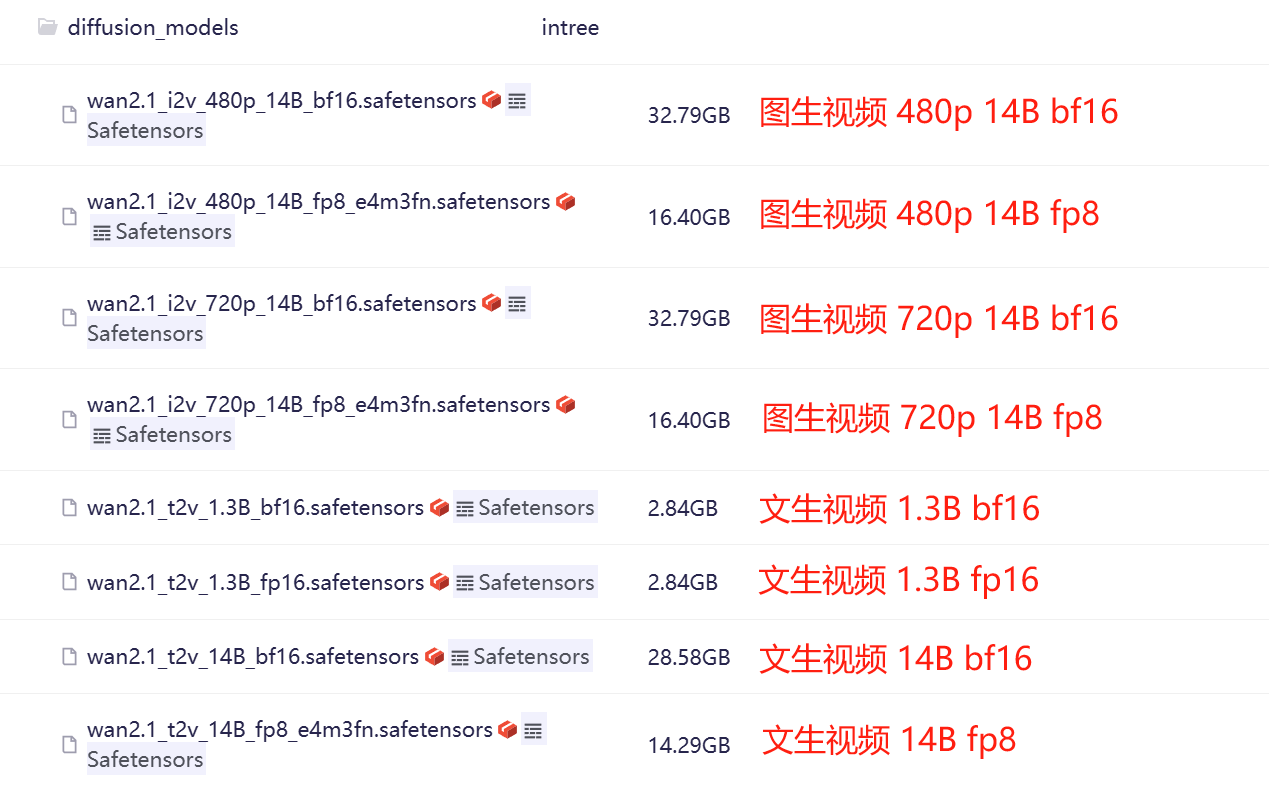
A simple explanation:
① Higher resolution, larger scale, higher precision consume more resources.
② For text-to-video 1.3B, bf16 and fp16 will basically have no difference in effect. Theoretically, bf is more suitable for training, and fp has better inference optimization.
③ The resolution for text-to-video models, based on online information, can generate both 480p and 720p.
④ You can download the files within the folder or directly download the folder as a zip. ComfyUI can select the path under the secondary folder.
3. Download the workflow.
ComfyUI provides official example workflows, in the example workflows_Wan2.1 folder. There are these three; you can download them directly:

These official workflows do not include a video export node. If you need to export as video, you can manually chain a video combine node at the end, selecting h264-mp4 or h265-mp4 format.
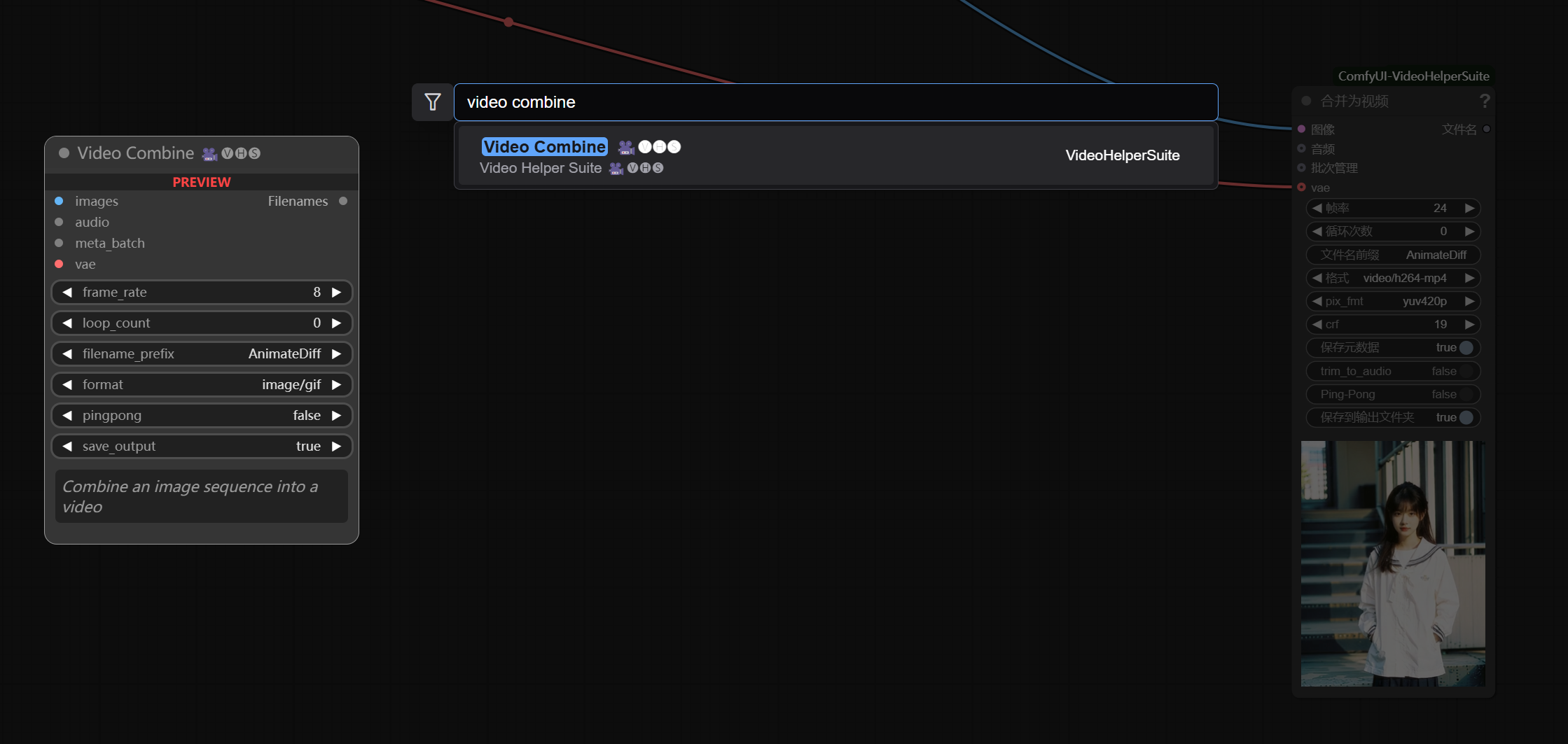
If you don’t know how, you can directly use the workflow with the video export node I added: Wan2.1 Workflow.
4. Import and use the workflow.
Importing the workflow is very simple. After starting ComfyUI, it will automatically open a page like this; just drag the workflow JSON file directly into it.
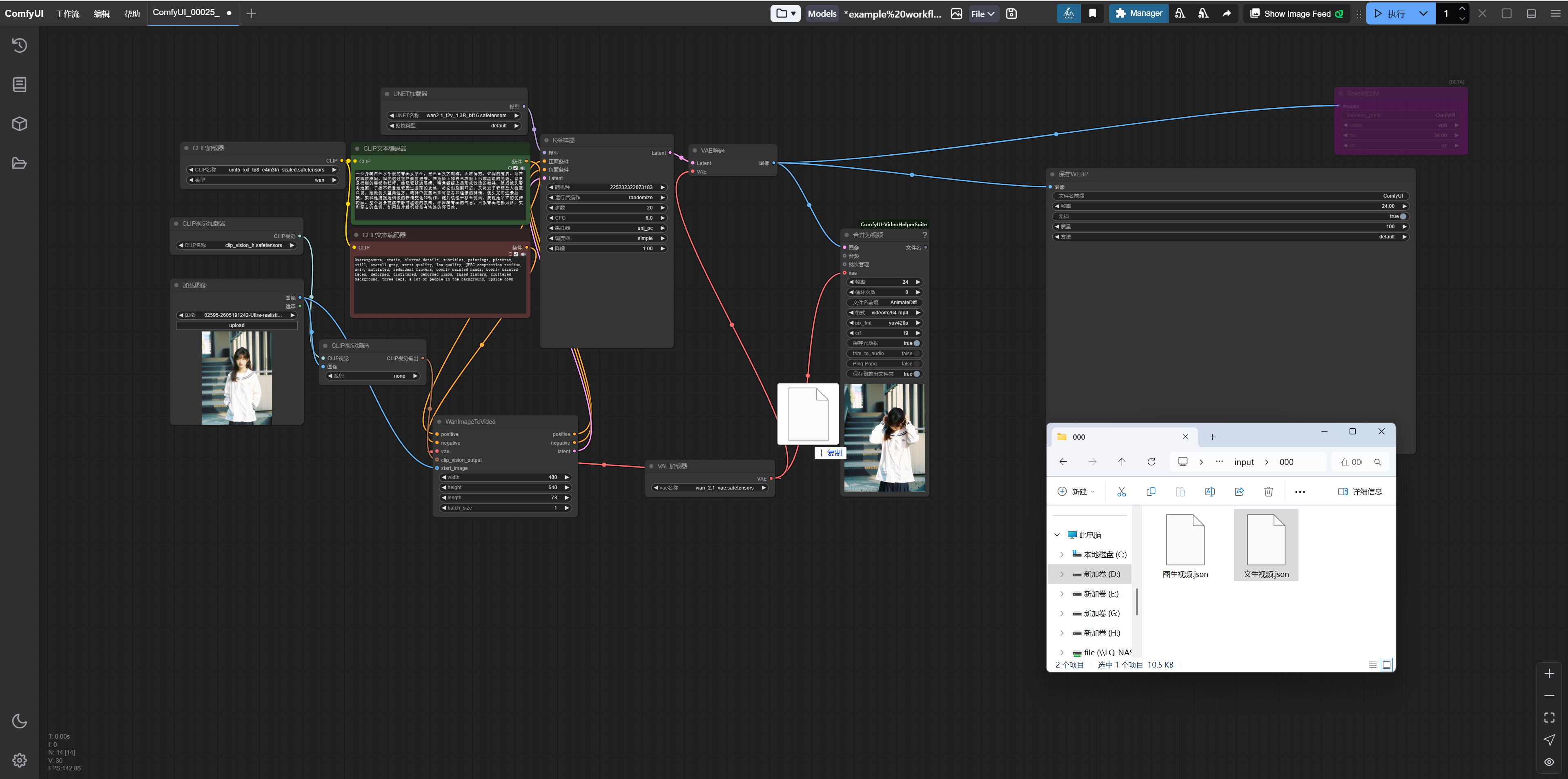
Then you can generate your video.
That’s all the content, thank you for following!